How to Access Your Gisma University of Applied Sciences Student Portal and Sign Documents Electronically
This guide provides detailed instructions on how to access your MyPage Student Portal and sign documents electronically. Follow these steps carefully to ensure a smooth experience with your student administrative tasks.
1. Accessing Your MyPage Student Portal
MyPage Student Portal is your central hub for managing all administrative and academic information during your studies at Gisma University of Applied Sciences. Through the portal, you can:
- Signing documents electronically
- View your timetable and attendance records
- Access your financial information and other resources available to students
- Review Gisma University of Applied Sciences policies, procedures, and the Students’ Code of Conduct
- Upload and manage important documents such as your Visa or Residence Permit
Step-by-Step Login Instructions:
I. Activate Your Account
- You will receive an email containing your study contract. This email includes a unique activation link for your MyPage Student Portal account.
- Click this link to activate your account and begin setting up your portal access.
II. Student Number
- Your Gisma University of Applied Sciences Student Number starts with GH******. You will need this to log in.
III. Create a Secure Password
- We encourage you to use the same password when registering on MyPage Student Portal as the one used for the Online Application Portal and/or AppHero, ensuring it meets the required criteria outlined below.
- Your password must meet the following requirements:
- At least 8 characters—the more characters, the better
- A mixture of both uppercase and lowercase letters
- A mixture of letters and numbers
- Inclusion of at least one special character, e.g., !@#?]
Initial Access Limitations:
During early registration, your portal access is restricted to a few sections. Full access will be granted once your enrolment is formally completed.
2. Signing Documents Electronically
Once logged in, you may be required to sign official Gisma University of Applied Sciences documents electronically. Follow these instructions carefully:
I. Locate the Document
- After logging in, a message will appear at the top of your page. Please click "Sign Document" to proceed.

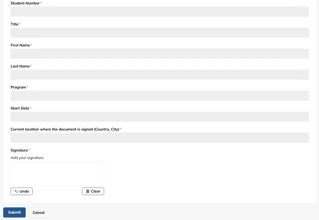
II. Verify Your Personal Details
- Carefully check the following fields:
- Title, First Name, Last Name
- Programme and Start Date
- If any details are incorrect, contact the Admissions team immediately before signing.
III. Add Your Signature
- Enter the city and country where you are signing the document.
- Enter your signature in the designated field exactly as instructed.
- Ensure that both the place of signature and your signature are complete and legible.
IV. Submit the Document
- After signing, click Submit.
- Your document will be sent to the Admissions team for verification.
V. Confirmation
- You will receive an automated email once the Admissions team has accepted and processed your document.
- Keep this email for your records.
3. Need Assistance?
If you encounter any issues or have questions during the login or document signing process, contact your Student Advisor directly or email us at admissions@gisma.com.